
Nerd Fonts,
installed the boring way.
A small, scriptable Go CLI that turns "download the zip, unzip it, move the files, refresh the cache, repeat" into one config file and one command.





$ curl -fsSL https://worxbend.github.io/nerd-fonts-installer/install.sh | sh
Linux & macOS · single static binary · no runtime deps
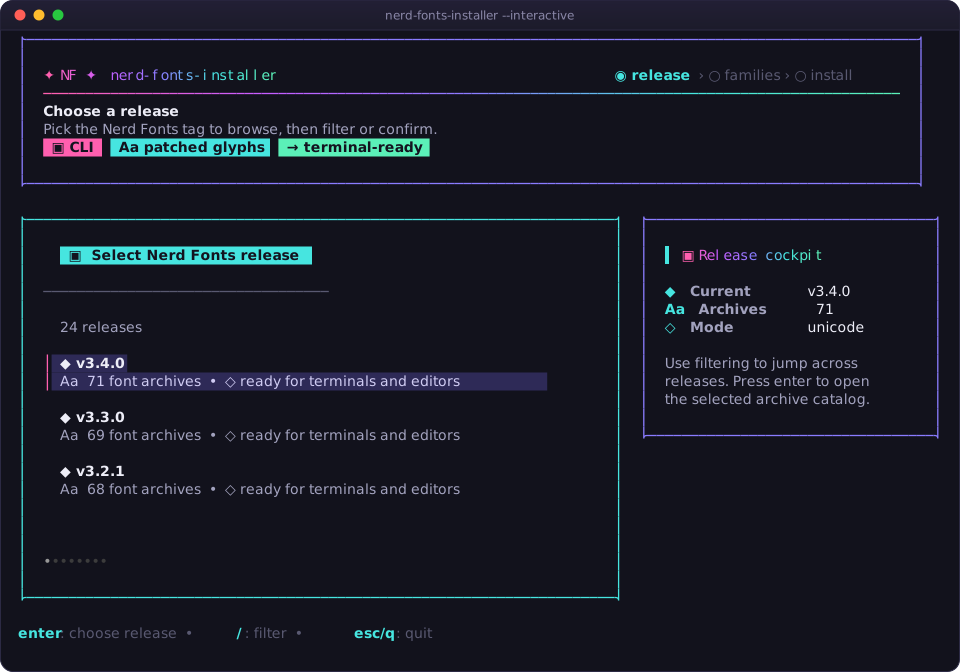
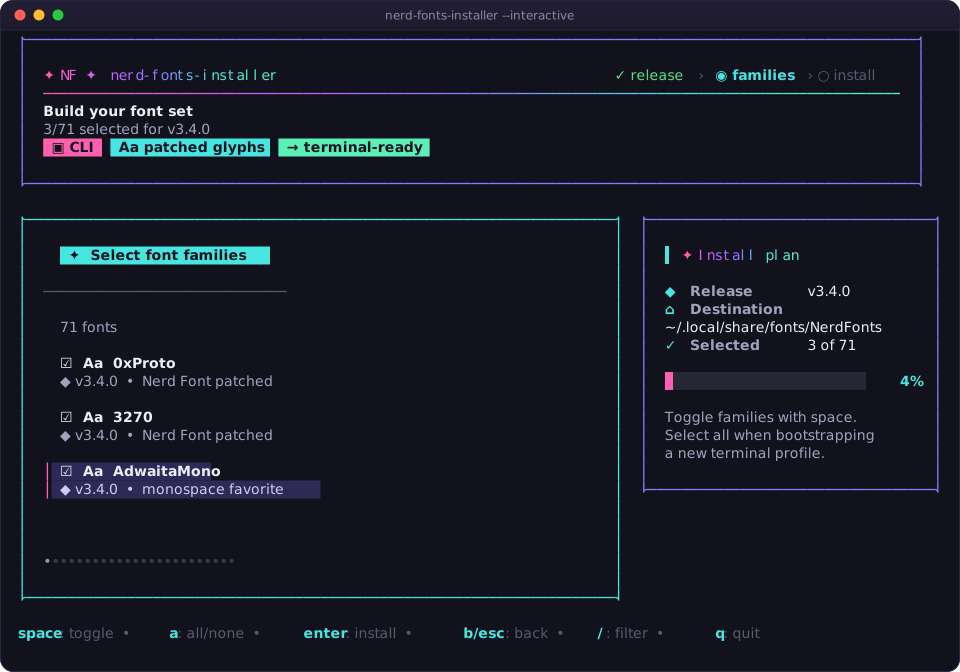
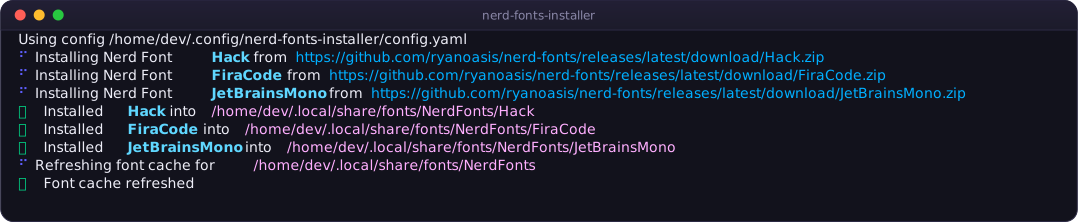

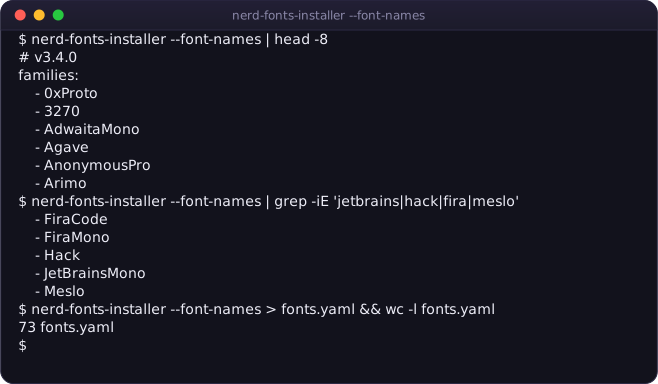
Real captures — every screenshot is generated from an actual run of the tool.
Font setup that survives a reinstall
Built for people who rebuild machines, maintain dotfiles, and want the same glyphs everywhere.
Declarative config
One YAML, JSON, or .conf file lists the release and the families. Commit it with your dotfiles and every machine gets the same fonts.
Interactive picker
No config yet? --interactive opens a Bubble Tea TUI: choose a release, filter and tick families, hit enter.
Checksum verified
Every archive is checked against the release's SHA-256.txt manifest. A digest mismatch aborts the install rather than shipping a corrupt font.
Concurrent installs
Families download and extract in parallel with clean, non-interleaved progress output. Ten fonts take about as long as the slowest one.
Atomic & reversible
Each family is staged in a temp directory and renamed into place, keeping a .old backup. A failed download never leaves half a font behind.
Preview before you write
--dry-run prints every URL and destination path without touching disk. --font-names prints paste-ready family names.
Three steps to patched glyphs
From nothing installed to a working Nerd Font in your terminal.
Install the binary
One command. Detects your platform, verifies the checksum, drops the binary in ~/.local/bin.
$ curl -fsSL https://worxbend.github.io\
/nerd-fonts-installer/install.sh | sh

$ nerd-fonts-installer \
    --version
Write a config
Drop this at ~/.config/nerd-fonts-installer/config.yaml and pick your families.
release: latest
refresh_font_cache: true
families:
  - JetBrainsMono
  - Hack
  - FiraCode
  - Meslo

# destination defaults to
# ~/.local/share/fonts/NerdFonts
Preview, then install
Check the plan, run it for real, then select the font in your terminal or editor.
$ nerd-fonts-installer --dry-run
$ nerd-fonts-installer

# no config? the picker
# can build one for you
$ nerd-fonts-installer \
    --interactive
Pick your flavour
One static binary, no runtime dependencies. fc-cache is used when present and skipped safely when not.
Install script RECOMMENDED
Detects your OS and architecture, verifies the SHA-256 against the release manifest, and installs into ~/.local/bin. No root, nothing system-wide.
$ curl -fsSL https://worxbend.github.io/nerd-fonts-installer/install.sh | sh

# pin a version, or install somewhere else
$ curl -fsSL https://worxbend.github.io/nerd-fonts-installer/install.sh \
    | NFI_VERSION=v1.0.7 NFI_INSTALL_DIR=~/bin sh
Release tarball
Linux and macOS, amd64 and arm64. The latest tag keeps the URLs stable for scripts.
$ base=https://github.com/worxbend/nerd-fonts-installer/releases/download/latest
$ file=nerd-fonts-installer_latest_linux_amd64.tar.gz

$ curl -LO "$base/$file"
$ curl -LO "$base/checksums.txt"
$ sha256sum --check --ignore-missing checksums.txt
$ tar -xzf "$file"
From source
Go 1.26 or newer. Nothing else to install.
$ git clone https://github.com/worxbend/nerd-fonts-installer
$ cd nerd-fonts-installer
$ go build -trimpath -o bin/nerd-fonts-installer \
    ./cmd/nerd-fonts-installer
Config & flags
Four config keys and six flags. That is the whole surface area.
| Key | Required | Default | Meaning |
|---|---|---|---|
release | No | latest | Nerd Fonts release to install from — latest or a tag like v3.4.0. |
destination | No | ~/.local/share/fonts/NerdFonts | Root folder for installed families. Each family gets its own subfolder. |
refresh_font_cache | No | false | Run fc-cache -f <destination> after installing. |
families | Yes | — | Font archive names without .zip. Use --font-names to list them. |
| Flag | What it does |
|---|---|
--config <path> | Use a specific config file instead of discovering one. |
--dry-run | Print the plan — every URL and destination — without writing anything. |
--font-names | Print YAML-ready family names for the selected release and exit. |
--interactive | Open the terminal picker when no config file is found. |
--icons <mode> | TUI icon set: auto, nerd, unicode, or ascii. |
--version | Print version, commit, and build date. |
Questions people actually ask
I'd rather not pipe a script into my shell.
sh that does four things: detect your platform, download the release archive,
verify its SHA-256, and copy one binary into ~/.local/bin. Or download and run it
separately:
curl -fsSL -O https://worxbend.github.io/nerd-fonts-installer/install.shless install.sh && sh install.sh
The tarball and from-source routes above skip the script entirely.
Where does it look for a config file?
--config wins, then NERD_FONTS_INSTALLER_CONFIG, then app-named files
in the current directory, then $XDG_CONFIG_HOME (when absolute), then
~/.config. It checks nerd-fonts-installer.{yaml,yml,json,conf} and
nerd-fonts-installer/config.{yaml,yml,json,conf} at each location.
I installed a font but the icons are still boxes.
JetBrainsMono Nerd Font, in your
app's font setting and restart it.
What are the exact family names?
nerd-fonts-installer --font-names. It prints a YAML block you can paste
straight into families:, matched to whichever release your config pins.
Does it work on macOS?
fc-cache usually is not installed there, so the cache refresh is skipped
safely. Many macOS users install into a local folder first and then import with Font Book.
Can I pin a release so my dotfiles are reproducible?
release: v3.4.0. Pinned releases use the tagged download URL, so the same
config produces the same bytes on every machine.
Is it safe to run in a bootstrap script?
fc-cache is executed
without a shell. Exit codes are stable: 0 success, 2 for input you
can fix, 1 for runtime failures.
Stop unzipping fonts by hand.
Install it, write four lines of YAML, and never think about Nerd Fonts again.