
One YAML profile.
Every binary.
binstaller turns a single declarative profile into the same set of command-line tools on every machine — with a dry-run plan you read first, sha256 verification you can trust, and a lock file that pins the result.
curl --proto '=https' --tlsv1.2 -sSfL https://github.com/worxbend/binstaller/releases/latest/download/install.sh | sh
Small scope. Sharp edges filed off. 🧰
It does one job — installing binary tool distributions — and refuses to become a package manager, a dotfiles runner, or a shell-script host.
Plan before you apply
binstaller plan resolves every version, URL, archive mapping and symlink, then prints exactly what would happen. Nothing touches the filesystem.
Checksums, loudly
SHA-256 is verified when configured — and when it is missing, the plan says so in red. policy.mode: strict makes unverified downloads a hard failure.
Lock files
binstaller lock writes resolved versions, URLs and digests to JSON. apply --locked refuses to drift from it.
SSRF-guarded downloads
HTTPS only. Loopback, link-local, private and cloud-metadata hosts are rejected — and every redirect hop is re-validated before it is followed.
Resumable state
Apply state is written after every tool result and keyed to the manifest fingerprint, so a re-run skips what already succeeded.
Native, no JVM
Shipped as a GraalVM native image for Linux and macOS on amd64 and arm64. One binary, instant start, no runtime to install.
Archives handled
Direct binaries, zip, tar.gz and tar.xz — with member paths validated so nothing escapes the staging root.
Symlinks, opt-in sudo
Local symlinks by default. System-wide ones require allowSudoSymlinks and are flagged as sudo risk in the plan.
Update awareness
binstaller versions prints what you pinned next to the newest GitHub release, so drift is visible without applying anything.
Three commands, start to finish 🚀
Install the binary, describe your tools once, then plan and apply anywhere.
Install binstaller
The script verifies the release checksum, and the Sigstore signature too when cosign is present.
curl --proto '=https' --tlsv1.2 -sSfL \
  https://github.com/worxbend/binstaller/releases/latest/download/install.sh | sh
Describe your tools
Start from the example profile and keep it in version control next to your dotfiles.
cp config.example.yaml config.yaml
$EDITOR config.yaml
Plan, then apply
Read the plan, narrow it with --only / --skip, then let it run.
binstaller plan
binstaller apply
binstaller versions
Output you can actually read 📸
Script-friendly text by default, colour and live progress when a terminal is attached.
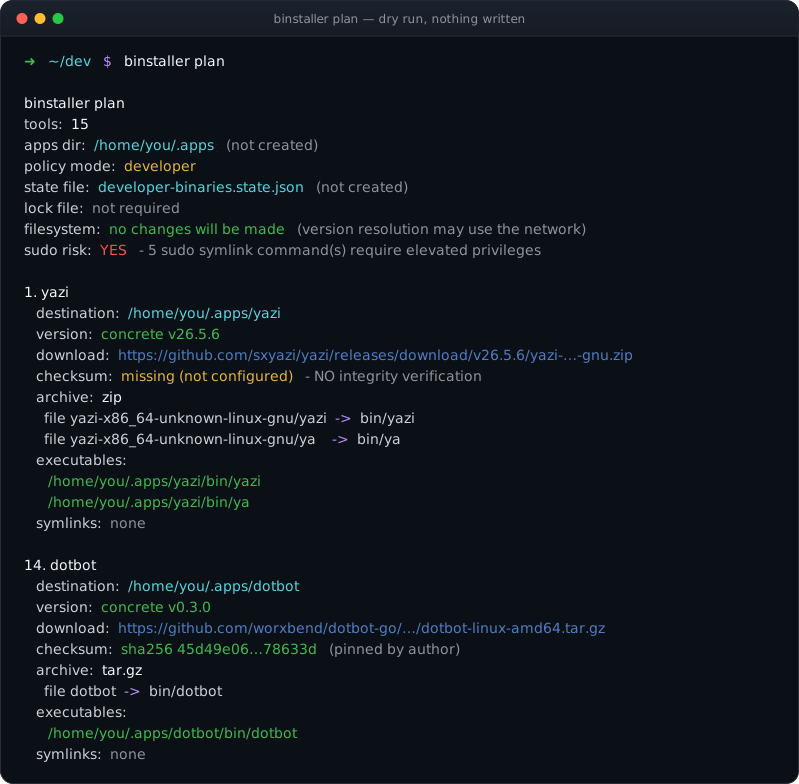
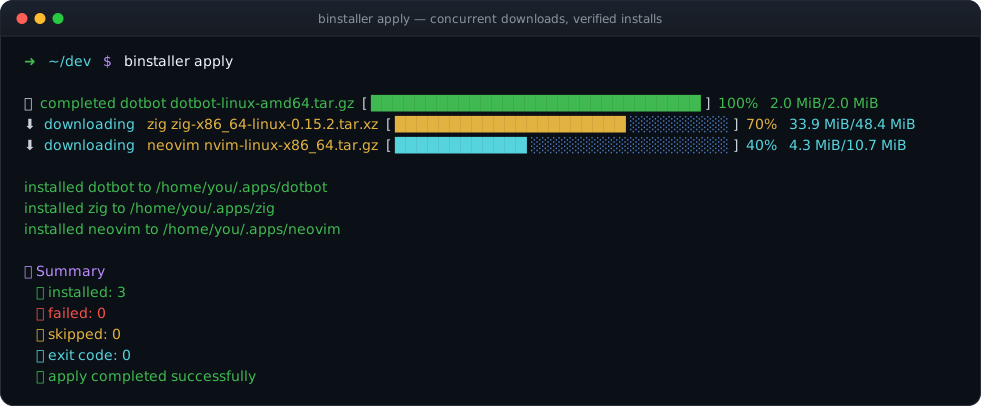
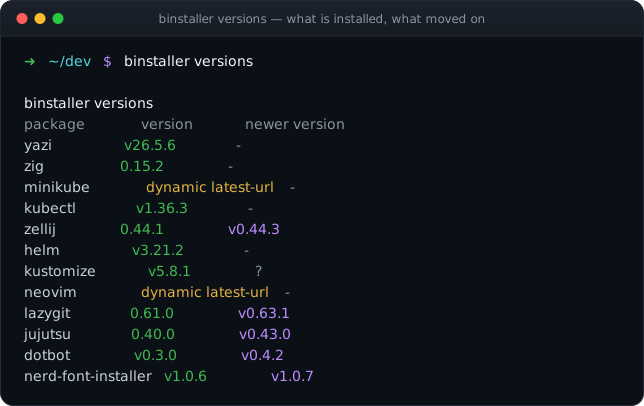
One file describes the whole toolchain 📄
Declarative, reviewable in a pull request, and validated before a single byte is downloaded.
apiVersion: binstaller.io/v1alpha1
kind: BinaryDistributionProfile

spec:
  policy:
    mode: strict
    appsDir: "${HOME}/.apps"
    allowSudoSymlinks: false

  versions:
    lazygit: 0.61.0
    kubectl:
      resolver:            # resolve at plan time
        type: http-text
        url: https://dl.k8s.io/release/stable.txt

  plan:
    - name: lazygit
      kind: binary-tool
      spec:
        versionRef: lazygit
        installDir: "${appsDir}/lazygit"
        download:
          url: "https://github.com/.../v${version}.tar.gz"
          filename: lazygit.tar.gz
          checksum:
            algorithm: sha256
            value: 45d49e06…78633d
          archive:
            type: tar.gz
            extract:
              files:
                - from: lazygit
                  to: bin/lazygit
        executables:
          - path: bin/lazygit
Everything is checked up front ✅
- 🚫Installer scripts are rejected — no shell syntax, no inherited environment, no surprise sudo.
- 🔤Only safe variables interpolate —
HOME,USER,SHELL,XDG_*. A manifest can't smuggle a secret into a URL. - 🧭Selection is explicit —
--onlyis applied first, then--skip, always in manifest order. Both take comma- or space-separated lists and can be repeated. - 🧱Strict mode rejects dynamic latest URLs, missing checksums, sudo symlinks and tar.xz fallback extraction.
- 🧾Duplicates and dangling refs fail at load time, not halfway through an install.
Four commands. That's the whole API. 🎛️
Predictable exit codes: 0 success, 1 resolution or apply failure, 2 usage error.
| Command | What it does | Writes files |
|---|---|---|
plan | Render the resolved install plan. | No |
apply | Download, verify, stage, install, symlink, save state. | Yes |
versions | Print package versions and available updates. | No |
lock | Resolve and write a JSON lock file. | Lock file only |
# Plan or apply just one entry from the manifest
binstaller plan  --only lazygit
binstaller apply --only lazygit

# Comma- or space-separated — target several tools in one flag
binstaller apply --only lazygit,neovim
binstaller apply --only lazygit neovim

# --only is also repeatable, and repeats combine with lists
binstaller apply --only lazygit --only neovim

# --skip removes one entry and runs the rest
binstaller apply --skip neovim

# --only is applied first, then --skip — combine them
binstaller plan --only lazygit,neovim --skip neovim
Test or install a single tool 🎯
No separate "single tool" command is needed — every command takes --only and --skip, matched against the name in spec.plan.
- 🔍Dry-run one tool —
binstaller plan --only lazygitresolves and prints just that entry, writing nothing. - 🚀Install one tool — the same flag on
applydownloads, verifies and stages only what matches. - 📋Lists work too — comma- or space-separated in one flag, and the flag can also be repeated; both forms combine.
- 🧭Order is fixed —
--onlynarrows the set first, then--skipremoves from what's left. - 🎛️Works on
plan,apply,versionsandlockalike — same flags, same manifest order.
Ready in one line 🎉
Install the native binary, copy the example profile, and run binstaller plan. Nothing is written until you say apply.